



Çok eski bir web tarayıcısı kullanıyorsunuz. Bu veya diğer siteleri görüntülemekte sorunlar yaşayabilirsiniz..
Tarayıcınızı güncellemeli veya alternatif bir tarayıcı kullanmalısınız.
Tarayıcınızı güncellemeli veya alternatif bir tarayıcı kullanmalısınız.
Soru toplama macrosunda sıra numarasını da dikkate aldırma
- Konbuyu başlatan incsoft
- Başlangıç tarihi
- Katılım
- 4 Haziran 2005
- Mesajlar
- 15,622
- Excel Vers. ve Dili
- Ofis 365 Türkçe
Merhaba,
Deneyip sonucu bildirin lütfen.
Deneyip sonucu bildirin lütfen.
Kod:
Sub ToplamAL()

    Dim i As Long, _
        j As Long, _
        d As Variant

    Columns("H:H").Insert Shift:=xlToRight, CopyOrigin:=xlFormatFromLeftOrAbove
    Range("H1") = "TUTAR"
    Columns("I:I").Delete Shift:=xlToLeft

    d = Range("A2").Value
    j = 2
    For i = 2 To Cells(Rows.Count, "A").End(3).Row + 1
        If Not Cells(i, "A") = d Then
            Cells(j, "H") = "=SUM(D" & j & ":D" & i - 1 & ")"
            If Not j = i - 1 Then
                With Range("H" & j & ":H" & i - 1)
                    .HorizontalAlignment = xlRight
                    .VerticalAlignment = xlTop
                    .MergeCells = True
                End With
            End If
            j = i
            d = Cells(i, "a")
        End If
    Next i

End SubMerhaba,
Deneyip sonucu bildirin lütfen.
Kod:Sub ToplamAL() Dim i As Long, _ j As Long, _ d As Variant Columns("H:H").Insert Shift:=xlToRight, CopyOrigin:=xlFormatFromLeftOrAbove Range("H1") = "TUTAR" Columns("I:I").Delete Shift:=xlToLeft d = Range("A2").Value j = 2 For i = 2 To Cells(Rows.Count, "A").End(3).Row + 1 If Not Cells(i, "A") = d Then Cells(j, "H") = "=SUM(D" & j & ":D" & i - 1 & ")" If Not j = i - 1 Then With Range("H" & j & ":H" & i - 1) .HorizontalAlignment = xlRight .VerticalAlignment = xlTop .MergeCells = True End With End If j = i d = Cells(i, "a") End If Next i End Sub
işlem görüyor hocam teşekkürler ancak form düzen ayarlarını bozmakta


- Katılım
- 5 Haziran 2006
- Mesajlar
- 6,906
- Excel Vers. ve Dili
- 2019, 2021, 2024 Türkçe
Merhaba.
Kodları revize ettim deneyiniz.
Kodları revize ettim deneyiniz.
Kod:
Sub ToplamAL()

    Dim i As Long, _
        j As Long, _
        d As Variant
    Columns("H:H").Insert Shift:=xlToRight, CopyOrigin:=xlFormatFromLeftOrAbove
    Range("H1") = "TUTAR"
    Columns("I:I").Delete Shift:=xlToLeft

    d = Range("A2").Value
    j = 2
    For i = 2 To Cells(Rows.Count, "B").End(3).Row + 1
        If Not Cells(i, "A") = d Then
            Cells(j, "H") = "=SUM(D" & j & ":D" & i - 1 & ")"
            Cells(j, "H").HorizontalAlignment = xlCenter
            If Not j = i - 1 Then
                With Range("H" & j & ":H" & i - 1)
                    .HorizontalAlignment = xlCenter
                    .VerticalAlignment = xlCenter
                    .MergeCells = True
                End With
            End If
            j = i
            d = Cells(i, "a")
        End If
    Next i
End SubMerhaba.
Kodları revize ettim deneyiniz.
Kod:Sub ToplamAL() Dim i As Long, _ j As Long, _ d As Variant Columns("H:H").Insert Shift:=xlToRight, CopyOrigin:=xlFormatFromLeftOrAbove Range("H1") = "TUTAR" Columns("I:I").Delete Shift:=xlToLeft d = Range("A2").Value j = 2 For i = 2 To Cells(Rows.Count, "B").End(3).Row + 1 If Not Cells(i, "A") = d Then Cells(j, "H") = "=SUM(D" & j & ":D" & i - 1 & ")" Cells(j, "H").HorizontalAlignment = xlCenter If Not j = i - 1 Then With Range("H" & j & ":H" & i - 1) .HorizontalAlignment = xlCenter .VerticalAlignment = xlCenter .MergeCells = True End With End If j = i d = Cells(i, "a") End If Next i End Sub
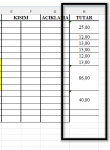
Olmuş teşekkürler hocam desteğiniz için. Birde hücre yapılarını bozmasa çok daha iyi olurdu. Toplam alınan alanı aşağıdaki gibi bozuyor
- Katılım
- 5 Haziran 2006
- Mesajlar
- 6,906
- Excel Vers. ve Dili
- 2019, 2021, 2024 Türkçe
Deneyiniz.
B sütunundaki satır sayısına göre işlem yapılmaktadır.
Eğer tablonuzun altında B sütununda başka veriler varsa onları da dikkate alacağından farklı biçimlendirme sonucu ortaya çıkabilir.
B sütunundaki satır sayısına göre işlem yapılmaktadır.
Eğer tablonuzun altında B sütununda başka veriler varsa onları da dikkate alacağından farklı biçimlendirme sonucu ortaya çıkabilir.
Kod:
Sub ToplamAL()

    Dim i As Long, _
        j As Long, _
        d As Variant
    Application.ScreenUpdating = False
    Columns("H:H").Insert Shift:=xlToRight, CopyOrigin:=xlFormatFromLeftOrAbove
    Range("H1") = "TUTAR"
    Columns("I:I").Copy
    Range("H1").PasteSpecial xlPasteFormats
    Range("G1").Activate
    Columns("I:I").Delete Shift:=xlToLeft

    d = Range("A2").Value
    j = 2
    For i = 2 To Cells(Rows.Count, "B").End(3).Row + 1
        If Not Cells(i, "A") = d Then
            Cells(j, "H") = "=SUM(D" & j & ":D" & i - 1 & ")"
            Cells(j, "H").HorizontalAlignment = xlCenter
            If Not j = i - 1 Then
                With Range("H" & j & ":H" & i - 1)
                    .HorizontalAlignment = xlCenter
                    .VerticalAlignment = xlCenter
                    .MergeCells = True
                End With
            End If
            j = i
            d = Cells(i, "a")
        End If
    Next i
    Application.ScreenUpdating = True
End SuDeneyiniz.
B sütunundaki satır sayısına göre işlem yapılmaktadır.
Eğer tablonuzun altında B sütununda başka veriler varsa onları da dikkate alacağından farklı biçimlendirme sonucu ortaya çıkabilir.
Kod:Sub ToplamAL() Dim i As Long, _ j As Long, _ d As Variant Application.ScreenUpdating = False Columns("H:H").Insert Shift:=xlToRight, CopyOrigin:=xlFormatFromLeftOrAbove Range("H1") = "TUTAR" Columns("I:I").Copy Range("H1").PasteSpecial xlPasteFormats Range("G1").Activate Columns("I:I").Delete Shift:=xlToLeft d = Range("A2").Value j = 2 For i = 2 To Cells(Rows.Count, "B").End(3).Row + 1 If Not Cells(i, "A") = d Then Cells(j, "H") = "=SUM(D" & j & ":D" & i - 1 & ")" Cells(j, "H").HorizontalAlignment = xlCenter If Not j = i - 1 Then With Range("H" & j & ":H" & i - 1) .HorizontalAlignment = xlCenter .VerticalAlignment = xlCenter .MergeCells = True End With End If j = i d = Cells(i, "a") End If Next i Application.ScreenUpdating = True End Su
Teşekkürler hocam ancak neden B sütununa göre işlem yapıyor? Orjinal formumda başka veri var.Önemli olan A sütunundaki numaralara göre işlem yapması. A sütunundaki numara farklılıklarına göre işlem yapmalı
Son düzenleme:
- Katılım
- 5 Haziran 2006
- Mesajlar
- 6,906
- Excel Vers. ve Dili
- 2019, 2021, 2024 Türkçe
Çünkü örnek dosyanızda A16 ve A17 de değer varken B,C ve D 16,17. satırlarda veri yok.
Yani en son değer 15. satırda var.
Yani en son değer 15. satırda var.
Çünkü örnek dosyanızda A16 ve A17 de değer varken B,C ve D 16,17. satırlarda veri yok.
Yani en son değer 15. satırda var.
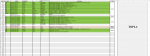
o örnek dosya hocam. Bu mantıkda çalışıyor dosyam.
- Katılım
- 5 Haziran 2006
- Mesajlar
- 6,906
- Excel Vers. ve Dili
- 2019, 2021, 2024 Türkçe
Kodu çalıştırdığınızda, istediğiniz sonucu alamıyor musunuz?
Eğer istediğiniz sonucu alamıyorsanız orijinal dosyanızı ekleyin kontrol edelim.
Eğer istediğiniz sonucu alamıyorsanız orijinal dosyanızı ekleyin kontrol edelim.
Kodu çalıştırdığınızda, istediğiniz sonucu alamıyor musunuz?
Eğer istediğiniz sonucu alamıyorsanız orijinal dosyanızı ekleyin kontrol edelim.
Ekli dosyalar
Kodu çalıştırdığınızda, istediğiniz sonucu alamıyor musunuz?
Eğer istediğiniz sonucu alamıyorsanız orijinal dosyanızı ekleyin kontrol edelim.
Muzaffer bey yeniden bakabildinizmi acaba?
Kodu çalıştırdığınızda, istediğiniz sonucu alamıyor musunuz?
Eğer istediğiniz sonucu alamıyorsanız orijinal dosyanızı ekleyin kontrol edelim.
Hocam sanırım olmadı bu sefer?
-
Sizlere daha iyi bir deneyim sunabilmek icin sitemizde çerez konumlandırmaktayız, web sitemizi kullanmaya devam ettiğinizde çerezler ile toplanan kişisel verileriniz Veri Politikamız / Bilgilendirmelerimizde belirtilen amaçlar ve yöntemlerle mevzuatına uygun olarak kullanılacaktır.