• DİKKAT

    DOSYA İndirmek/Yüklemek için ÜCRETLİ ALTIN ÜYELİK Gereklidir!
    Altın Üyelik Hakkında Bilgi

Outlook Reminder Kaydetme

Katılım
26 Ocak 2007
Mesajlar
4,625
Excel Vers. ve Dili
Ofis 2016
Merhaba Arkadaşlar,
Aşağıdaki kod ile Excelden Outlook Reminder'e veri gönderiliyor. İlgilenenlerin yararlanabilir.
Reminder olarak güzel çalışıyor ama Takvime kaydetmiyor. Takvime kaydetmesi için kodu nasıl revize etmek lazım ?

Private Sub Worksheet_Change(ByVal Target As Range)
'GTU WORK
If Target.Column <> 9 And Target.Row < 2 Then Exit Sub
Dim MSOutlook As Object, Takvim As Object
Set MSOutlook = CreateObject("Outlook.Application")
Set Takvim = MSOutlook.CreateItem(1)

With Takvim
.Start = Target.Value + TimeValue("08:00:00")
.End = .Start + TimeValue("08:30:00")
.Subject = Target.Offset(0, -3).Value
.Location = Target.Offset(0, -1).Value
For i = 1 To 9
x = x & Cells(1, i) & " : " & Cells(Target.Row, i) & vbCrLf
Next
.Body = x
.BusyStatus = olBusy
.ReminderMinutesBeforeStart = 120
.ReminderSet = True
.Save
End With
Set Takvim = Nothing
Set MSOutlook = Nothing
End Sub
 
Merhaba,
Bu kodlarla toplantı oluşturuyorum, deneyebilirsiniz.
PHP:
Sub Toplanti_Olustur()
    Dim Outlook As Object
    On Error Resume Next
    Set Outlook = CreateObject("Outlook.Application")
    Dim Item As AppointmentItem
    Set Item = Outlook.CreateItem(olAppointmentItem)
    With Item
        For i = 2 To Cells(Rows.Count, "A").End(3).Row
            .MeetingStatus = 1 'olMeeting=1, olMeetingCanceled=5
            .Start = Cells(i, 5).Value + Cells(i, 6).Value
            .End = Cells(i, 7).Value + Cells(i, 8).Value
            '.Duration = "00:05"
            .Subject = Cells(i, 1).Value
            .Location = Cells(i, 2).Value
            .Body = Cells(i, 4).Value
            .BusyStatus = 2 'olBusy
            .ReminderMinutesBeforeStart = Cells(i, "J").Value
            .ReminderSet = True
            '.Mileage = 22
            .Recipients.Add Cells(i, 3).Value
            .Recipients.ResolveAll
            '.Display
            '.Save
            .Send
            Cells(i, "K").Value = "ü"
        Next i
    End With
    MsgBox "Islem Tamam", vbInformation, "www.excelarsivi.com"
End Sub
213368
 
Merhaba,
Bu kodlarla toplantı oluşturuyorum, deneyebilirsiniz.
PHP:
Sub Toplanti_Olustur()
    Dim Outlook As Object
    On Error Resume Next
    Set Outlook = CreateObject("Outlook.Application")
    Dim Item As AppointmentItem
    Set Item = Outlook.CreateItem(olAppointmentItem)
    With Item
        For i = 2 To Cells(Rows.Count, "A").End(3).Row
            .MeetingStatus = 1 'olMeeting=1, olMeetingCanceled=5
            .Start = Cells(i, 5).Value + Cells(i, 6).Value
            .End = Cells(i, 7).Value + Cells(i, 8).Value
            '.Duration = "00:05"
            .Subject = Cells(i, 1).Value
            .Location = Cells(i, 2).Value
            .Body = Cells(i, 4).Value
            .BusyStatus = 2 'olBusy
            .ReminderMinutesBeforeStart = Cells(i, "J").Value
            .ReminderSet = True
            '.Mileage = 22
            .Recipients.Add Cells(i, 3).Value
            .Recipients.ResolveAll
            '.Display
            '.Save
            .Send
            Cells(i, "K").Value = "ü"
        Next i
    End With
    MsgBox "Islem Tamam", vbInformation, "www.excelarsivi.com"
End Sub
Ekli dosyayı görüntüle 213368
Üstad teşekkür ederim. Bu kod desteğiniz çok iyi oldu.
Kaydet ekranı çıkıyor. Ayrıca onay vermeden kaydetmesi sağlanabiliyor mu
 
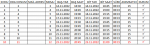
Arkadaşlar bu makroyu çalıştırınca listenin tamamını işlemiyor, hata nerede bakabilirmisiniz?
 
240807


Şöyle bir listede sadece kırmızı ile yazan satırı ekliyor.
 
Geri
Üst